
On July 21st, we got an email that OpenAI opened up their ad platform for everyone, so now the big question is “how to advertise on ChatGPT”? Fortunately, the answer is a lot simpler compared to most other advertising platforms AND being able to show up with your expertise directly within a conversation on ChatGPT is powerful. Now when your potential clients are researching and developing things where your business shines, you can inject yourself directly into the conversation.
In this blog post, we are going to cover the simple 4 steps you need to follow so that you can go from nothing to having ads running across ChatGPT. We also have included a free OpenAI ad planning tool at the end to help you get started.
If you prefer to watch rather than read, here is a video of our founder Paul Sokol going from the email announcement about ads on OpenAI all the way through to having a campaign launched, from start to finish.
The original unscripted recording was about 25 minutes long. Justin edited it down for your viewing pleasure.
What ChatGPT Advertising Is and Why B2B Service Businesses Should Care Now
ChatGPT advertising places your ad directly inside a live conversation when a User’s topic matches the context you provide. For B2B service businesses with longer buying cycles, this means showing up while a prospect is actively researching, not after they have already left to search elsewhere.
These are ads placed right into the context of a ChatGPT conversation. As people converse with the LLM, your ad can show up and push people to your resources and offerings. Classic advertising legends such as Gary Halbert have taught that you have to be able to enter the conversation your prospects are already having in their own words. Your business can show up exactly at the right time when people are talking to their AI, and align your advertising with their buying cycle or research behavior.
This is different from how targeting ads on Google or Meta work. With Google, you are targeting by the keywords, kinds of websites and types of videos that people use. With Meta, you are targeting based on their different interests and behaviors. With ChatGPT advertising you are neither using keywords nor behaviors.
So, while running ads on OpenAI follows the same OAC Framework that all advertising platforms use, this kind of advertising is quite different from other digital arenas. But do not let that intimidate you. As you will see when we get to the ad group section in Step 3, it is very simple to tell ChatGPT what kinds of conversations should trigger your ads.
Step 1: Create Your ChatGPT Ads Manager Account
Creating a ChatGPT Ads Manager account requires a legal business name, a credit card on file, and a website that OpenAI’s system can use to pull your logo. Business verification through an EIN is optional at signup but required before you can send traffic beyond your homepage.
As with any advertising platform, you first need to establish your account. Make sure you have the following information handy first:
- Legal business name.
- Credit card to put on file for billing.
- Your business’ EIN for the business verification (optional but required to run ads to beyond your website’s homepage).
Once you have that information ready, the best place to start is directly from the OpenAI Ads homepage: https://ads.openai.com/
When you go to sign up for an advertising account, if you do not already have a normal OpenAI account you will need to create one first (the signup flow will guide you through this if needed). If you only have a personal OpenAI account, we highly recommend you create a new one with your business email and use that for the advertising account.
Creating the advertising account is similar to creating a new account on other platforms. You have to give the ad account a name, choose your billing currency and time zone, and select your industry. There is also a question asking whether you are running ads for yourself or as an agency for others. As of publishing, you are not able to create an agency ad account: you must select running ads for yourself. Along the way you will also provide your website which the platform will use to pull your logo and basic information for a simple ad; you can always change this later before publishing.
Once you have gone through the few steps to create the new ad account, you will be taken to the setup wizard for your first campaign, which starts with your Objective.
Step 2: Set Your Campaign Objective
Setting your campaign Objective means choosing what you are bidding on: Reach, Clicks, or Conversions. Most businesses should choose Clicks at minimum, or Conversions if a tracking pixel is installed, along with a location, a budget of at least $25 per day, and a start date.
The “O” in OAC stands for Objective and every campaign has a specific one. Remember, all ad platforms are giant digital auction houses where you are bidding against other advertisers for the chance to show your ad. The campaign objective is exactly what you are bidding on. When advertising on ChatGPT you can run a campaign for Reach, Clicks or Conversions. If you can get the OpenAI tracking pixel/tag on your website to send events (such as a lead magnet opt-in), we recommend always doing a Conversion campaign. However, since digital tracking can be technical, at the very least you should run a campaign for Clicks. That way you are paying for traffic to the ad’s destination. The Reach objective is really only useful for large brands with a lot of budget to burn on awareness.
In addition to choosing your ad auction Objective, you will also need to choose:
- The location(s) to run your ads along with any location(s) to exclude. As of publishing you can only select from a fixed list of countries.
- If you want to include/exclude any custom audiences (e.g. a list of email addresses).
- Either a daily or lifetime budget. The minimum daily budget is $25 which is higher than most other self-serve platforms such as Google or Meta.
- Your campaign start date and optional end date.
To get started faster, we recommend keeping it simple by targeting specific location(s) and setting a $25 daily budget. Even without an end date, you can always manually disable the campaign after it has launched. And if the campaign is working well, you can always increase the daily budget.
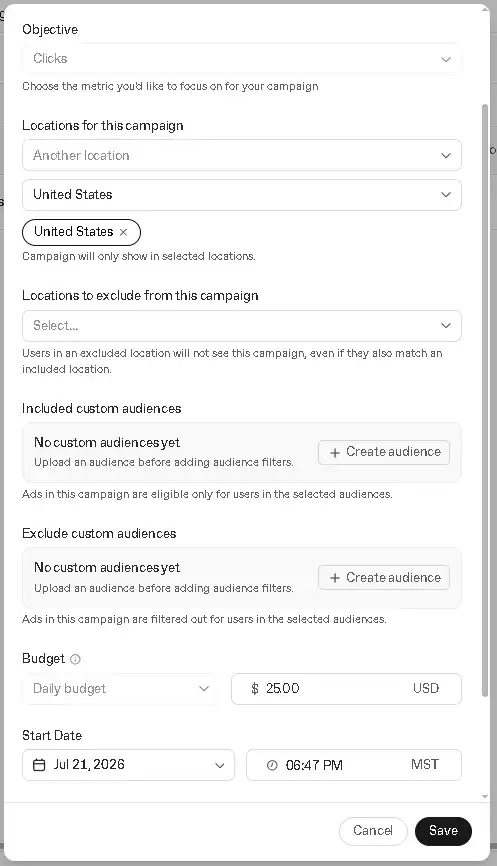
Unlike other ad platforms, the location and audience inclusions/exclusions are configured at the Campaign level.
Once you have configured the handful of Campaign options, the next step is to configure your Audience settings, which really only has one major component you will need to think about.
Step 3: Define Your Audience (Ad Group Setup)
Defining your Audience happens inside a single ad group, where you set a maximum CPC bid and write Context Hints, plain-English sentences describing the conversations where your ad should appear. Context Hints are the only real targeting lever ChatGPT ads offer, so they deserve the most attention in setup.
The “A” in OAC stands for Audience and every campaign has at least one. When we run ads for ourselves and clients, we will typically have multiple audiences within a single campaign. To keep it simple for your first ChatGPT ad campaign we recommend sticking with one ad group (Audience) until you get more comfortable with the platform and your advertising skills.
Fortunately, there are only two major ad group options to configure. First, you have to set your maximum CPC (Cost-per-Click) bid. In other words, what is the highest you are willing to pay for a click. This places a solid cap on when to bow out of the digital auction. As of publishing, the lowest CPC bid that still remains competitive is $3.00. This is a fair CPC compared with other platforms such as Google or Meta.
The next ad group option to configure is the “Context Hints”. Which, oddly enough, is optional for the ad group. However, since the Context Hints are the only place you can do any kind of specific targeting for your ad, we would never recommend skipping this.
This is where ChatGPT ads are the most different from other platforms such as Google or Meta and where we recommend you put most of your effort when it comes to your campaign. Think of it like the “prompt” for your audience targeting. Rather than approach it like a list of keywords, phrases or topics of interest, use full sentences instead and provide as much context for the AI machine as possible so it knows exactly for which kinds of conversations your ads are relevant.
For example, if we wanted to run ads for our free mini-course, How To Automate Like A Pro, it would be a bad idea to lazily set our Context Hints as “crm, customer journey, automation, keap, gohighlevel, hubspot”. That does not really give the OpenAI platform enough information to serve meaningful ads to its Users.
A better idea would be to treat the Context Hint like a promotional post that you might publish on social media, “This free mini-course is for anyone who wants to maximize their CRM usage whether they use Keap, GoHighLevel, HubSpot, etc. The training is platform agnostic and works with any system because the focus is on the customer journey itself. This course can be completed in less than half an afternoon (about 2 hours worth of videos) and includes working Google Doc copies of the same internal tools that Be Pro uses to Plan and Build world-class customer journeys. We cover customer journey storyboarding, messaging for automation, and concepts around integrating systems together with tools like Zapier or Make.”
Remember: this is an AI ad platform so you can speak to the targeting you want in plain English exactly like you would speak with the AI itself as a User. We believe the people who figure out how to “win” at ChatGPT ads will be the ones who are able to masterfully engineer their Context Hints so that their ads show up in the conversations their target audience will be having.
There is another more advanced option available which is the ability to adjust your bids based on custom audiences. If you uploaded a list of your prospects to OpenAI as a custom audience, you could increase your bid significantly to reach more of those people. Or you could upload a list of your employees and do a negative 100% bid to exclude them from seeing your ads. This is the same idea as bid adjustments that you find on Google ads. For example, when we run video ads on YouTube we typically do a 100% bid decrease on connected TVs since people typically cannot “click a link” on a YouTube ad in their living room so we skip those placements entirely by adjusting the bid to nothing.
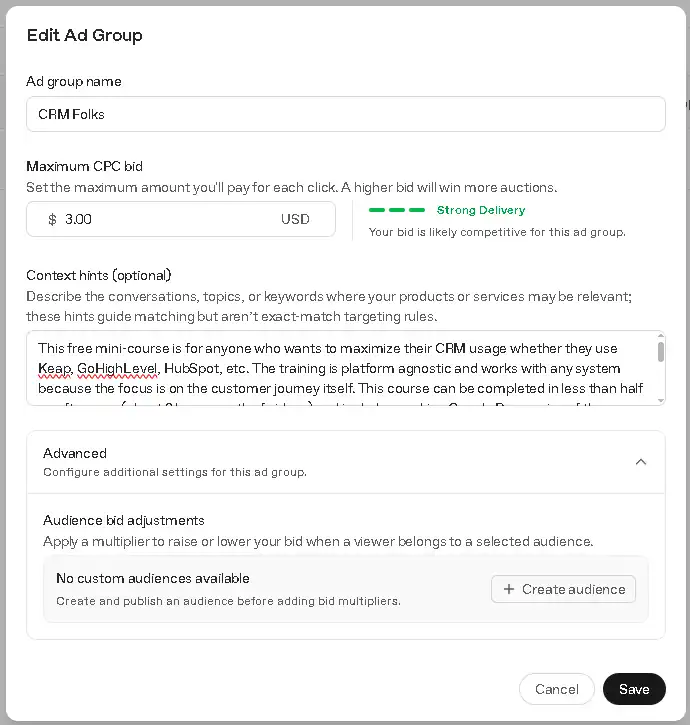
Feel free to write as much as you want in your Context Hints as long as you can stay relevant and focused. When testing we were not able to find a character limit to this setting.
Once you have configured the CPC and Context Hints, the final step is to configure your Ads themselves, which are also minimally simple to set up.
Step 4: Build Your Creative (Ad Setup)
Building your Creative means writing one ad per ad group: a headline under 50 characters, a description under 100 characters, and an optional image. Most businesses should run 3 to 5 ad variations per ad group so the auction can determine which version performs best.
Lastly, the “C” in OAC stands for Creative aka the actual ad people will see. While every ad group needs at least one ad, when we run campaigns for ourselves and clients, we will typically have at least 3-5 ads or more for each audience. This way you are not putting all your eggs in one basket on ONE specific ad and hoping it works. Let the auction serve up a few different ads and let the results speak for themselves.
What we love about OpenAI ads is that the ad setup itself is minimal. Beyond the link where people go after clicking, you only have to write a short headline and description. The headline is limited to 50 characters and the description is limited to 100 characters.
There is also a small square image that accompanies the ad. By default, this is the logo that was sniffed out by the AI from your website when creating the ad account back in step 1. To keep things simple when starting out, stick with your logo since the ad image is small anyway. As you get more familiar with how the ads work for your businesses you can start testing out different ad images.
While it is generally a good idea to max out the available character limits on an ad platform, that can cause the messaging to get cut off and create an odd experience for the end user. We recommend sticking to around 30 characters or less for the headline, and around 60 characters or less for the description. You always want to pay attention to the preview to make sure your headline & description are not being cut off. Remember this ad will display in the middle of a conversation when someone is talking to ChatGPT so keep that context in mind while writing your ad copy.
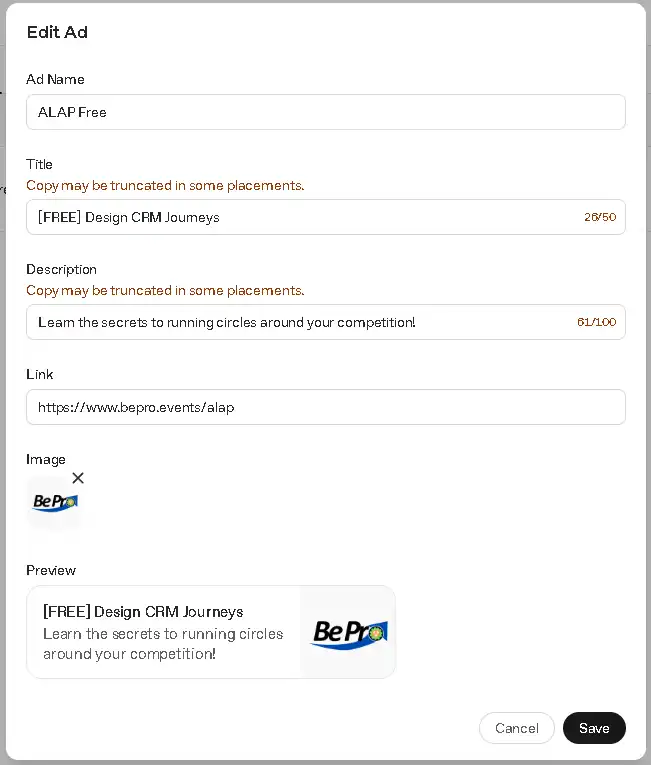
Notice how the ad preview does not truncate any of the headline or description.
Once you have configured the ad, you can proceed to launch the campaign. If this is your very first ad, you will need to put a card on file for billing before the campaign goes live.
4 Things to Know Before You Launch Your First ChatGPT Ad Campaign
Before launching a ChatGPT ad campaign, verify your business early if you plan to link beyond your homepage, plan on the setup wizard handling only one ad group and one ad at a time, and save your Context Hints and ad copy in a separate document first in case the wizard drops your campaign after you add a billing card.
While going through the initial setup, there were a few things that stood out to us you might want to consider:
- If you want to drive traffic to a link beyond your website’s homepage you must verify your business first. This takes time so if you are on a tight deadline to get ads out, you need to handle that verification as soon as possible.
- The campaign wizard is lean and pragmatic. If you want to get the conversion pixel on your site and use custom audiences right from the start, you will want to skip the wizard entirely and get those assets in place first.
- The campaign wizard also only allows you to configure one ad group with one ad initially. Once that has published you can duplicate/create new ads from the standard campaign interface.
- Even though we configured the whole campaign using the wizard, at the very end when we put our card on file it dropped the campaign and we had to rebuild it all over again. This might have been a bug since the ad platform is new but as a backup, you would be wise to copy/paste your context hint, ad headline and description into a separate document (such as our OpenAI Ad Planning Tool below) the very first time you launch a campaign on ChatGPT.
- After putting a card on file, OpenAI placed a $100 pending charge on the account to make sure the billing source is valid.
We have to hand it to OpenAI because they made advertising on ChatGPT really simple and straightforward. After creating your account, being able to set your campaign Objectives, Audience settings in the ad group, and the Creative itself in the ad(s) is something that can be done in a matter of minutes.
If anything, the most time will be spent on the Context Hints of your ad group. To help you get ChatGPT ads launched faster, we recommend you download our OpenAI Ad Plan Tool below so you can do all your strategizing outside of the platform. Then, launching the ads should be a fast copy/paste job!
Download the Free OpenAI Ad Planning Tool Now
The free OpenAI Ad Plan Tool combines the OAC framework with ChatGPT’s actual campaign settings in one Google Doc, so a business can plan Objective, Audience, and Creative details before ever opening Ads Manager, then copy the finished plan directly into the platform.
Our OpenAI Ad Plan template combines the foundational OAC framework with how ChatGPT ads are configured in the platform so that launching a campaign is fill-in-the-blank simple. Whether you are a one person operation, or have a whole team of stakeholders involved, having a documented campaign plan acts as single source-of-truth so that everyone can be on the same page before anything is loaded into the ad platform. There is also a built-in reporting section so you can track your performance from within the Plan itself and leave notes for future campaign improvements.
Free Resource Be Pro’s – OpenAI Ad Plan Template
Launch Your Ads Confidently And Quickly!
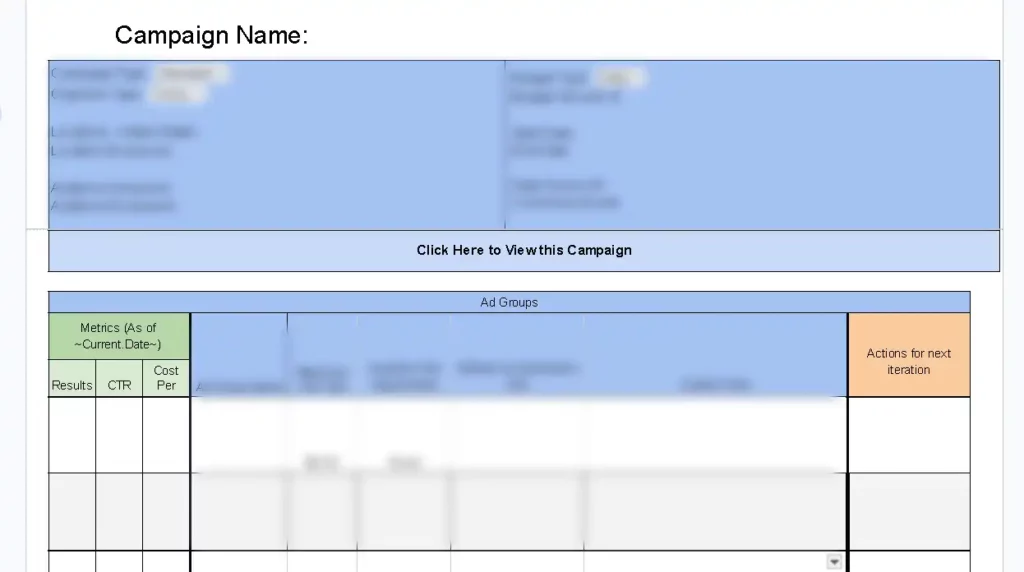
👇 Get Your Own Functioning Copy Of Our Google Doc 👇
Frequently Asked Questions
How much does it cost to advertise on ChatGPT? The minimum daily budget is $25 per campaign.
Who can run ads on ChatGPT? Anyone can run ads on ChatGPT as long as the platform is available in their country. All ads need to adhere to the OpenAI Ad Policies.
Is ChatGPT advertising available in my country? As of publishing, OpenAI ads are available in a handful of countries such as the United States, Canada, and the United Kingdom. (Click here for the full list of supported countries)
How is this different from Google or Meta Ads? OpenAI ads show up within User conversations in ChatGPT. Unlike Google or Meta the targeting is not based on specific phrases or behaviors but based on the context provided by the advertiser as to what kinds of conversations, topics, or keywords where your products or services may be relevant. There is no way to directly target specific words or phrases given the conversational nature of the ad platform.